> ## Documentation Index
> Fetch the complete documentation index at: https://docs.thinkrr.ai/llms.txt
> Use this file to discover all available pages before exploring further.
# Plans for Agencies and Businesses
> Thinkrr.ai offers tailored plans for both agencies and individual businesses. This guide explains how **thinkrr** and its **CRM** function within each environment, including features, account management, and key terms. Use this documentation to understand how to choose, customize, and optimize your plan.
## Thinkrr and thinkrr CRM for Agencies
[Thinkrr.ai](https://thinkrr.ai) offers tailored plans for both agencies and individual businesses. This guide explains how **thinkrr** its CRM function within each environment, including features, account management, and key terms. Use this documentation to understand how to choose, customize, and optimize your plan.
## 1. Thinkrr for Agencies
**Thinkrr** provides agencies with scalable infrastructure to serve multiple clients through sub-accounts, flexible billing models, and optional add-ons for branding and setup support.
### Kickstart
* **For solo users, startups, or small agencies**
* **Price:** \$39/month
* 100 monthly Premium minutes (recurring, rollover)
* Overage starts at \$0.09/min
* 1 sub-account with a Local Number
* Unlimited Inbound Agents
* Unlimited Plug & Play Outbound Agents
* GHL Native Integration
* Community access
* Access to Affiliate Program
* White Label available as an Add-On (\$99/month)
### Lite
* **For growing teams or agencies managing a few clients**
* **Price:** \$199/month
* 300 monthly Premium minutes (recurring, rollover)
* Overage starts at \$0.09/min
* 3 sub-accounts, each with a Local Number
* 1 **Knowledge Pack** slot to upload
* Web Widget access
* Unlimited Inbound & Outbound Agents
* Access to Affiliate Program
* White Label available as an Add-On (\$99/month)
### Unlimited
* **For scaling agencies managing multiple clients**
* **Price:** \$499/month
* 600 monthly Premium minutes (recurring, rollover)
* Overage starts at \$0.09/min
* Unlimited sub-accounts, each with a Local Number
* 2 **Knowledge Packs** slots to upload
* Web Widget access
* Access to Affiliate Program
* White Label available as an Add-On (\$99/month)
* Option to add **Agency Launchpad Add-On** (\$999/month) for done-for-you onboarding
### Terms & Definitions
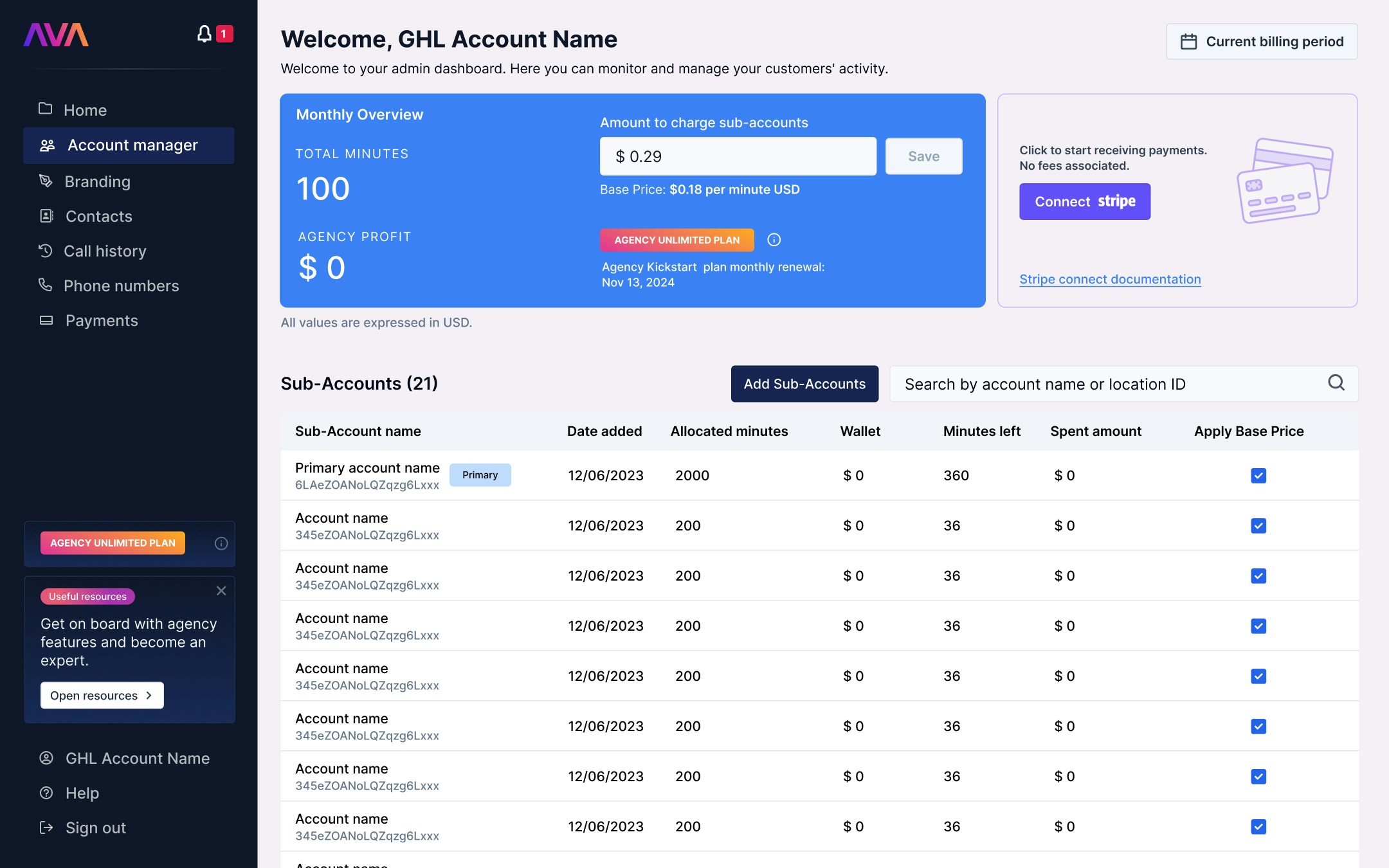
* **Agency Dashboard** Admin portal to manage Sub-accounts, monitor activity and spend, apply markups, and track profits.
* **Sub-accounts** Additional client accounts linked to the agency.
* Kickstart → 1 sub-account
* Lite → 3 sub-accounts
* Unlimited → Unlimited sub-accounts
* **Wallet** Dollar value of available minutes in a Sub-account, reflecting any markup.
* **Minutes Left** Usable minute balance, including monthly and rollover minutes.
* **Spent Amount** Total cost of minutes purchased during the current period (includes markup).
* **Apply Base Price**\
Overrides markup and charges Sub-account the standard Thinkrr rate (based on minute type).
 ### Subscription Start Date
* Establishes each Sub-account’s billing cycle.
* Renewal date shown in Monthly Overview.
### Metrics Tracked
* **Wallet Balance**: Dollar value of remaining minutes.
* **Spent Amount**: Total purchase cost this period.
* **Minute Usage**: Total of allocated and rollover minutes used this month.
## Agency Profit Calculation
**Agency Profit Formula**
**Profit** = (Markup per minute − Base rate per minute) × Total purchased minutes
**Example 1 – Basic Minutes:**\
Base rate = \$0.09/min\
Margin = \$0.03 → Client billed \$0.12/min\
Profit = \$0.03/min
**Example 2 – Premium Minutes:**\
Base rate = \$0.16/min\
Margin = \$0.03 → Client billed \$0.19/min\
Profit = \$0.03/min
***
## 2. Thinkrr and thinkrr CRM for Businesses
**Thinkrr** offers a single Business Plan designed for businesses that want powerful AI voice calling without the complexity of managing multiple clients.
**The Business Plan**
* *Ideal for businesses looking to automate inbound and outbound calling*
* **Price:** \$99/month
* 250 monthly Premium Voice Minutes (recurring)
* 3 Outbound Calling Projects
* 2 Inbound AI Receptionists (includes Web Widget)
* 1 Dedicated Local Phone Number
* Unlimited Call Transcripts & Analytics
* Native Integrations (Google Calendar, GoHighLevel, Jobber)
* 30-day free trial — cancel anytime
Business **thinkrr** accounts are designed for direct use, with no need to manage sub-accounts. Users only need to monitor their own monthly allotted minute usage. To view your balance, manage consumption, or purchase additional minutes, check the section below.
***
## Payment & Minute Management
Navigate to the Payments section to view and manage your current minute balance.
### Subscription Start Date
* Establishes each Sub-account’s billing cycle.
* Renewal date shown in Monthly Overview.
### Metrics Tracked
* **Wallet Balance**: Dollar value of remaining minutes.
* **Spent Amount**: Total purchase cost this period.
* **Minute Usage**: Total of allocated and rollover minutes used this month.
## Agency Profit Calculation
**Agency Profit Formula**
**Profit** = (Markup per minute − Base rate per minute) × Total purchased minutes
**Example 1 – Basic Minutes:**\
Base rate = \$0.09/min\
Margin = \$0.03 → Client billed \$0.12/min\
Profit = \$0.03/min
**Example 2 – Premium Minutes:**\
Base rate = \$0.16/min\
Margin = \$0.03 → Client billed \$0.19/min\
Profit = \$0.03/min
***
## 2. Thinkrr and thinkrr CRM for Businesses
**Thinkrr** offers a single Business Plan designed for businesses that want powerful AI voice calling without the complexity of managing multiple clients.
**The Business Plan**
* *Ideal for businesses looking to automate inbound and outbound calling*
* **Price:** \$99/month
* 250 monthly Premium Voice Minutes (recurring)
* 3 Outbound Calling Projects
* 2 Inbound AI Receptionists (includes Web Widget)
* 1 Dedicated Local Phone Number
* Unlimited Call Transcripts & Analytics
* Native Integrations (Google Calendar, GoHighLevel, Jobber)
* 30-day free trial — cancel anytime
Business **thinkrr** accounts are designed for direct use, with no need to manage sub-accounts. Users only need to monitor their own monthly allotted minute usage. To view your balance, manage consumption, or purchase additional minutes, check the section below.
***
## Payment & Minute Management
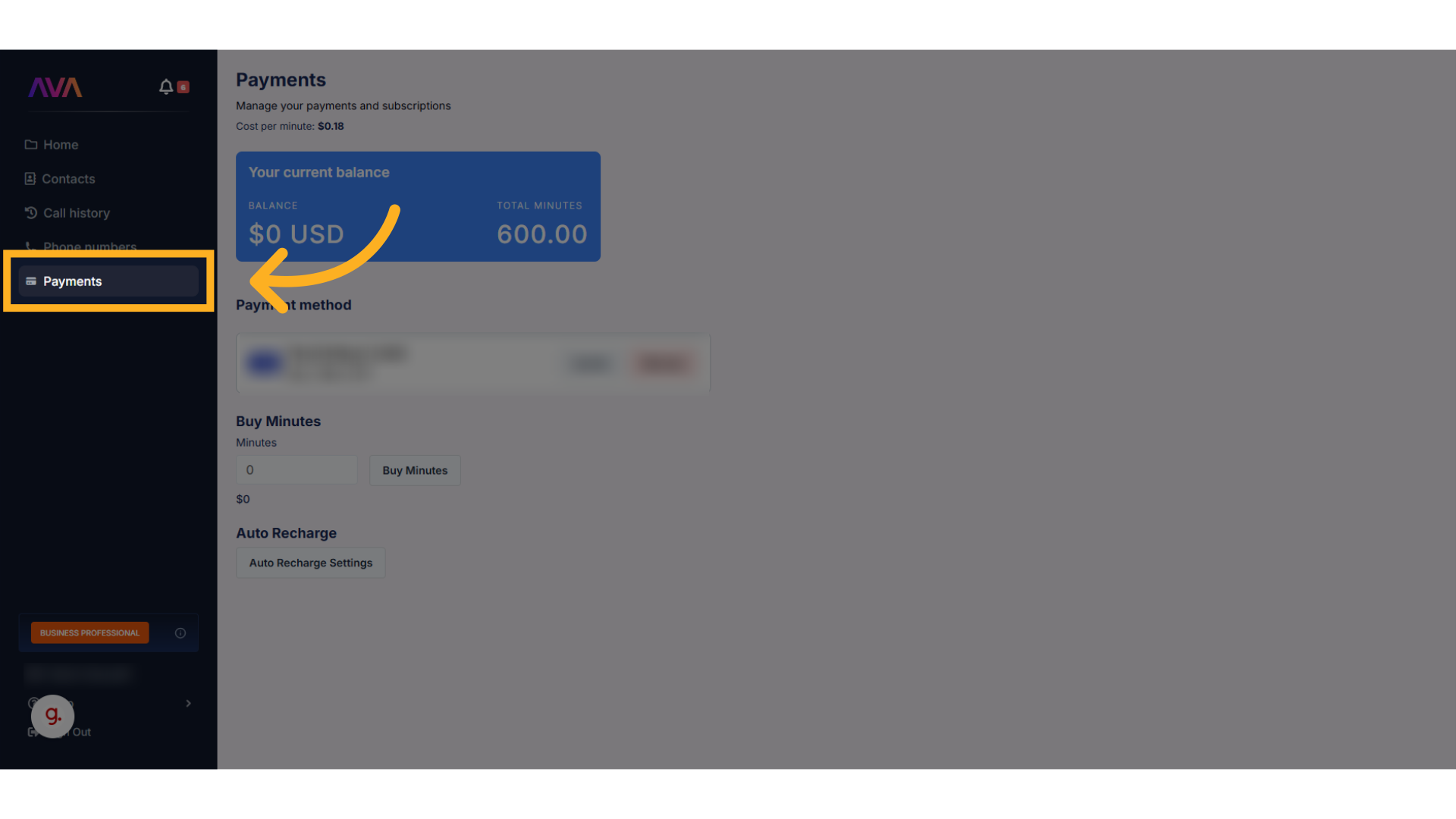
Navigate to the Payments section to view and manage your current minute balance.
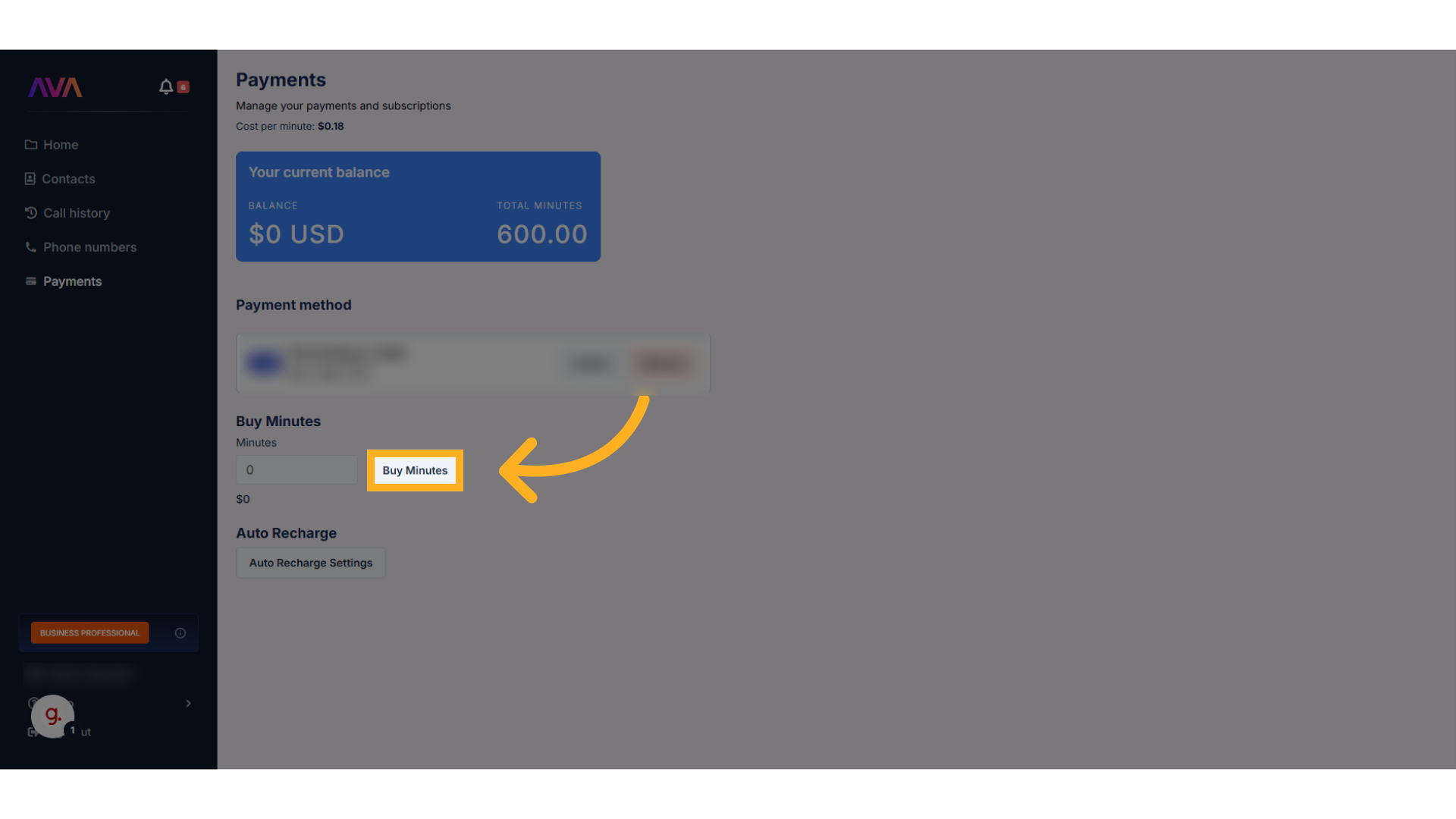
 Instantly purchase additional minutes if your balance is low and you need more immediately.
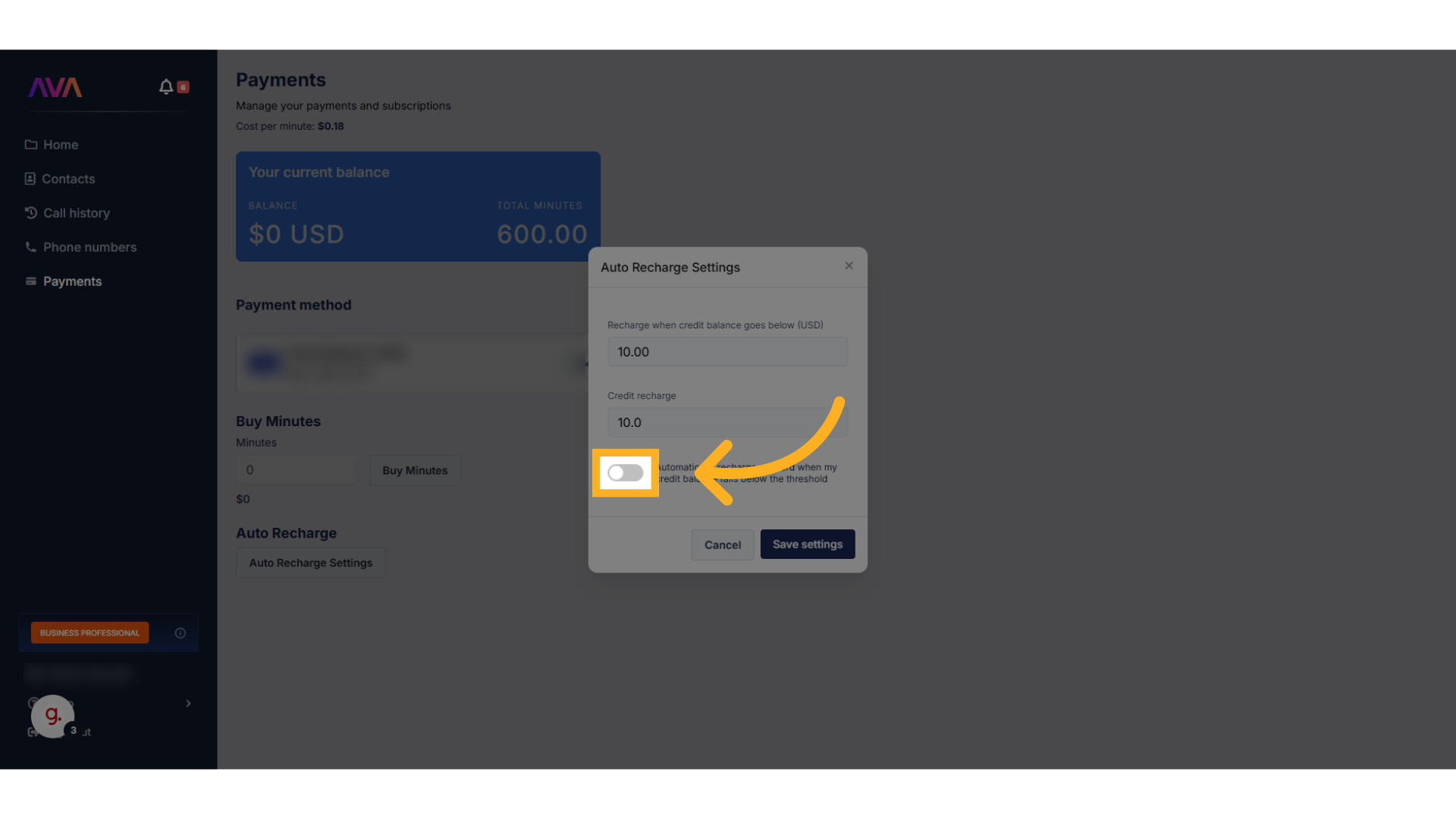
 Set up auto recharge to ensure your account is automatically topped up when minutes run low—this helps avoid interruptions in service.
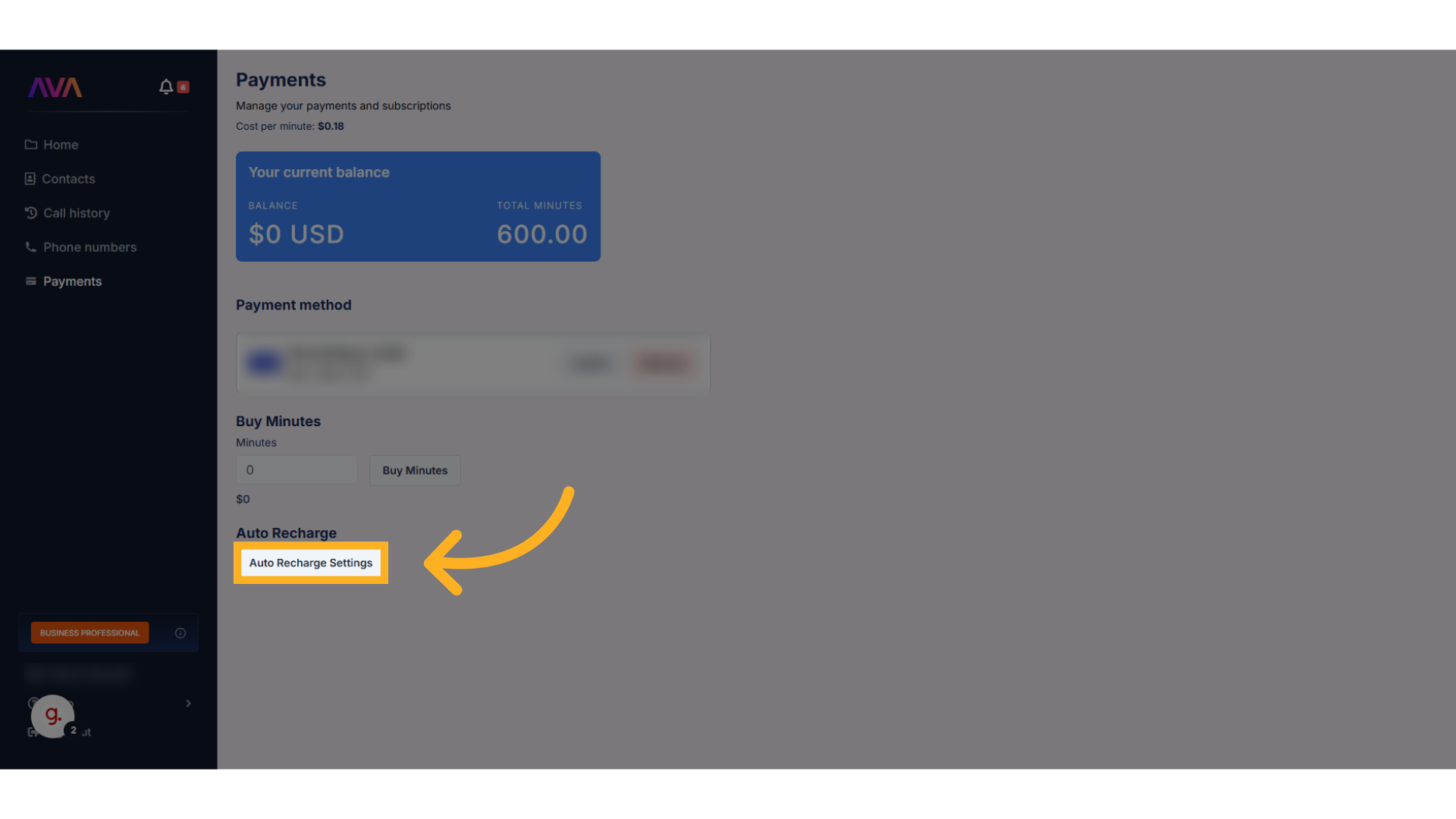 Choose the threshold and how many minutes to automatically add once the threshold is reached.\
While optional, auto recharge is highly recommended to prevent running out of minutes unexpectedly.
Choose the threshold and how many minutes to automatically add once the threshold is reached.\
While optional, auto recharge is highly recommended to prevent running out of minutes unexpectedly.
 ***
## Canceling Your Plan
To cancel your subscription, navigate to **Profile Settings** and follow the steps below:
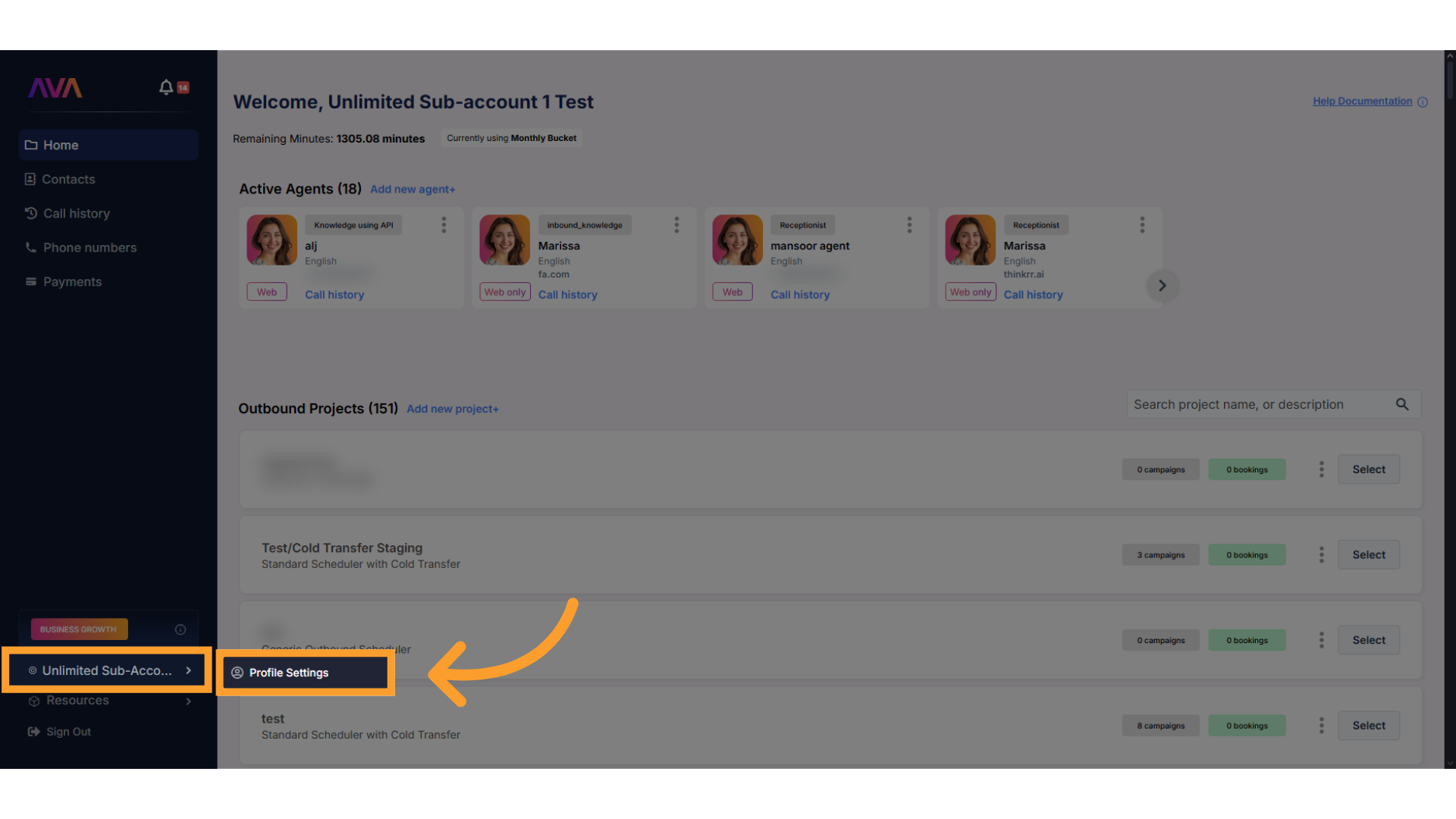
Hover over your **profile name** in the bottom-left corner and click **Profile Settings**.
***
## Canceling Your Plan
To cancel your subscription, navigate to **Profile Settings** and follow the steps below:
Hover over your **profile name** in the bottom-left corner and click **Profile Settings**.
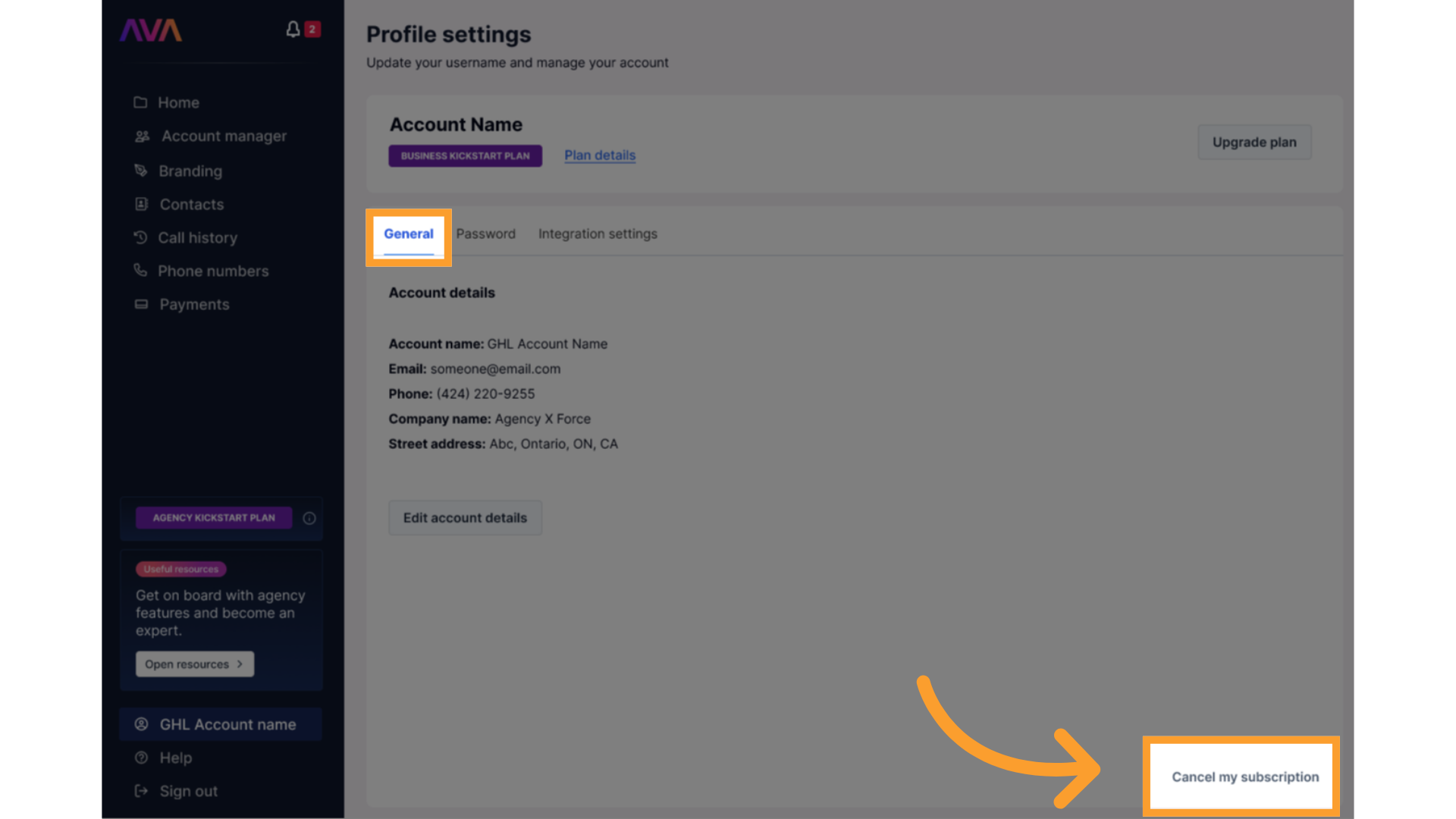
 In the **General** section, scroll to the bottom-left and click **Cancel Subscription**.
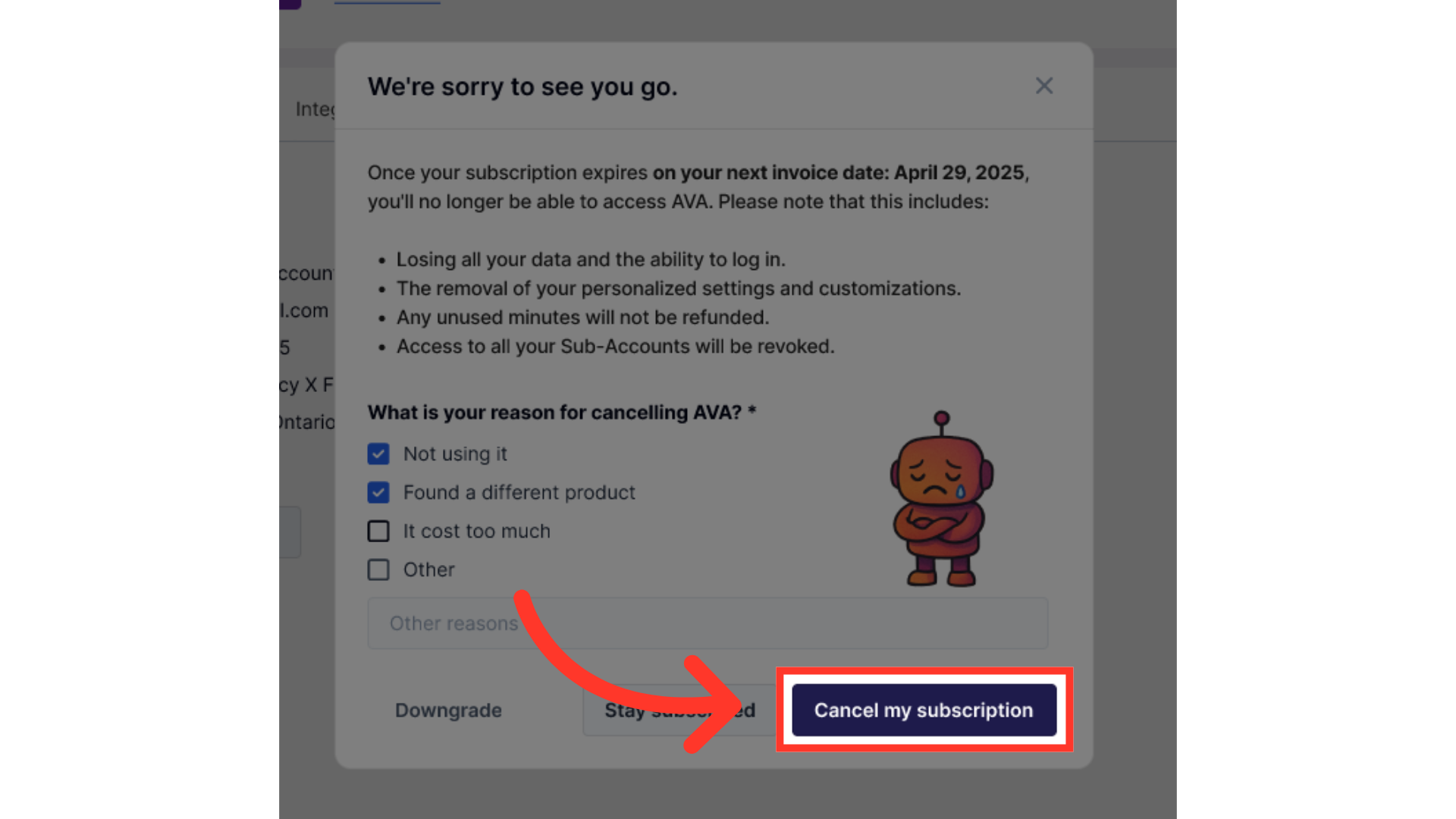
 Select a reason from the list or provide custom feedback. This information is recorded internally for reporting purposes.
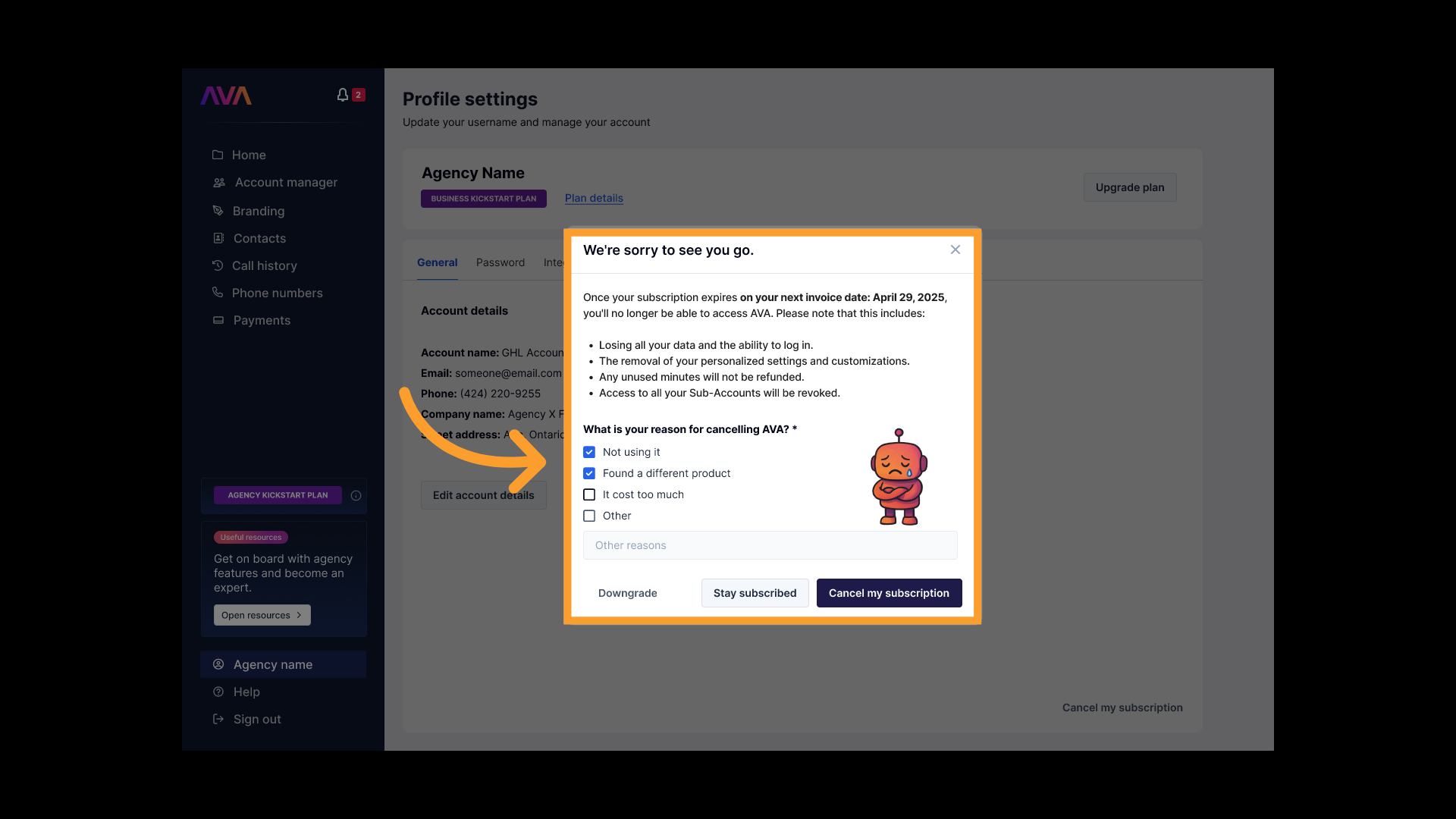 Click **Cancel My Subscription** to finalize.
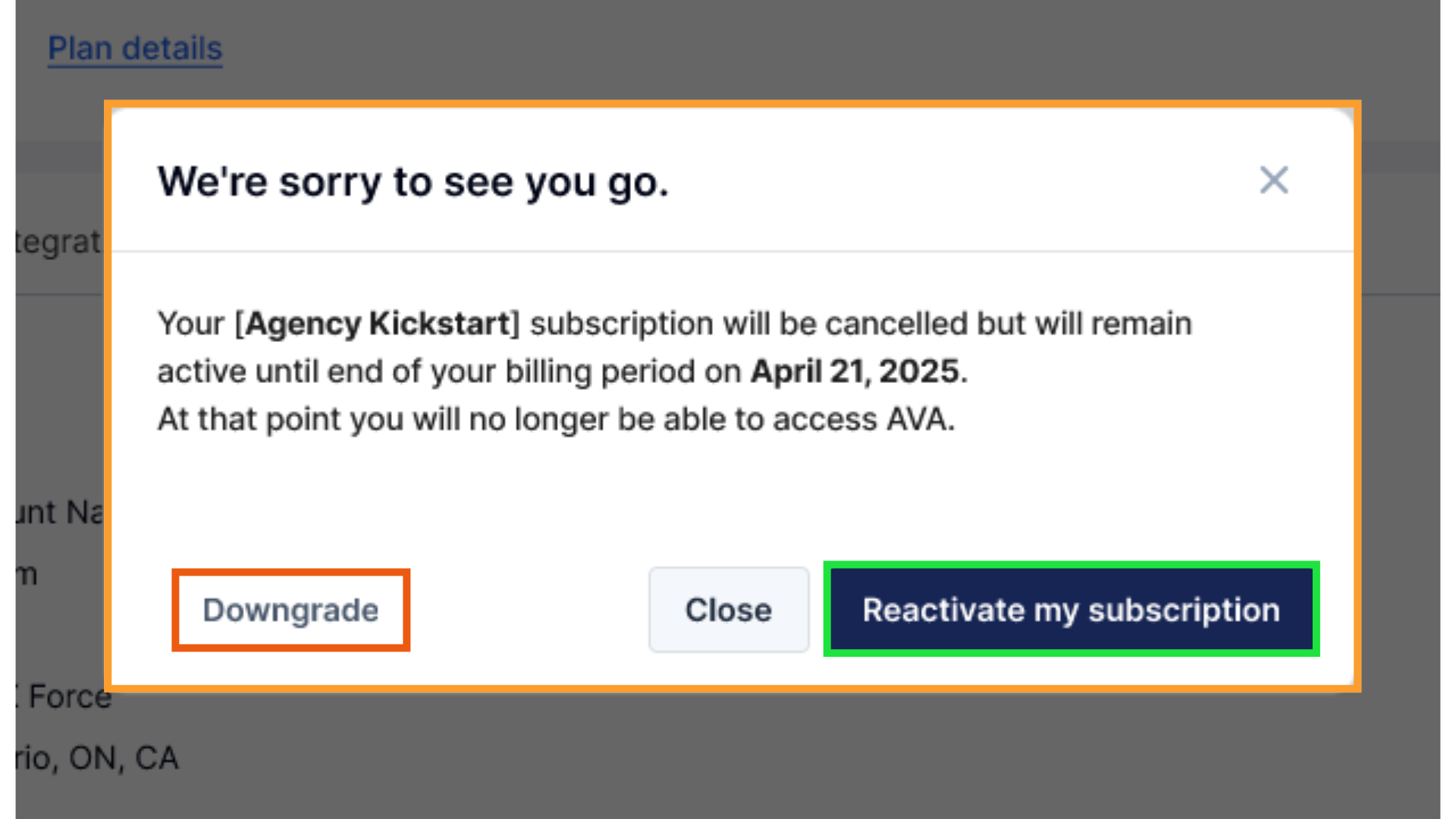
 A confirmation pop-up will appear. You'll have the option to immediately **reactivate**, **freeze**, or **downgrade** your subscription if you change your mind.
 You'll also receive an email confirming the cancellation.
> **ℹ️ Note:**\
> After cancellation, your account and all included **benefits will remain active** until the end of your current billing period. You'll **retain** access to **all features until the renewal date**.
> **⚠️ Warning:**\
> Once the primary account is canceled, **all associated sub-accounts will also be canceled**. Sub-account users will no longer be able to log in.
***
### Freezing or Pausing Your Account
If you're not ready to cancel entirely, you can choose to **freeze** your account instead. This activates a **Keep Access Plan** at a reduced rate.
* **Lite Users:** \$39/month
* **Kickstart Users:** \$4.99/month
* Keeps all agents, projects, and setup intact
* No new agents or clients can be added while frozen
* Can be reactivated instantly at any time
This option appears automatically during cancellation as an alternative to full account termination.
***
If you need assistance with your cancellation, please [submit a ticket](/Support-Ticket-System).
## FAQs & Troubleshooting
#### Subscription Plans
In your Admin Dashboard, you will see a badge detailing your current plan.
Yes. Please refer to our support site for assistance with plan changes.
Premium minutes offer higher-quality, more natural-sounding conversations — ideal for client-facing or sales calls.\
Basic minutes are faster and lower-cost, suitable for testing or high-volume internal campaigns.
Yes. During cancellation, you can switch to a reduced-rate Keep Access Plan to preserve your setup and data.
#### Minute Management & Rollover Rules
Yes. Paid plans include minute rollover. The Free plan (coming soon) does not.
Overage rates range from **\$0.09–\$0.30/min**, depending on whether you use Basic or Premium minutes.
#### Purchasing Credits
Yes, purchased credits carry over month-to-month. Allotted minutes refresh monthly.
The sub-account wallet reflects the dollar equivalent of their remaining minutes, including the markup.
#### Account Switching
You can view call history, wallet balances, and usage details for sub-accounts.
***
For additional questions or guidance, try using our [**Virtual Support Agent**](/Thinkrr-Support-Agent)! Available 24/7 to help resolve most issues quickly at [thinkrr.ai/support](https://thinkrr.ai/support).
If you still need assistance, visit our support site at [help.thinkrr.ai](http://help.thinkrr.ai) and submit a [Ticket](/Support-Ticket-System) or contact our team directly at [hello@thinkrr.ai](mailto:hello@thinkrr.ai).
You'll also receive an email confirming the cancellation.
> **ℹ️ Note:**\
> After cancellation, your account and all included **benefits will remain active** until the end of your current billing period. You'll **retain** access to **all features until the renewal date**.
> **⚠️ Warning:**\
> Once the primary account is canceled, **all associated sub-accounts will also be canceled**. Sub-account users will no longer be able to log in.
***
### Freezing or Pausing Your Account
If you're not ready to cancel entirely, you can choose to **freeze** your account instead. This activates a **Keep Access Plan** at a reduced rate.
* **Lite Users:** \$39/month
* **Kickstart Users:** \$4.99/month
* Keeps all agents, projects, and setup intact
* No new agents or clients can be added while frozen
* Can be reactivated instantly at any time
This option appears automatically during cancellation as an alternative to full account termination.
***
If you need assistance with your cancellation, please [submit a ticket](/Support-Ticket-System).
## FAQs & Troubleshooting
#### Subscription Plans
In your Admin Dashboard, you will see a badge detailing your current plan.
Yes. Please refer to our support site for assistance with plan changes.
Premium minutes offer higher-quality, more natural-sounding conversations — ideal for client-facing or sales calls.\
Basic minutes are faster and lower-cost, suitable for testing or high-volume internal campaigns.
Yes. During cancellation, you can switch to a reduced-rate Keep Access Plan to preserve your setup and data.
#### Minute Management & Rollover Rules
Yes. Paid plans include minute rollover. The Free plan (coming soon) does not.
Overage rates range from **\$0.09–\$0.30/min**, depending on whether you use Basic or Premium minutes.
#### Purchasing Credits
Yes, purchased credits carry over month-to-month. Allotted minutes refresh monthly.
The sub-account wallet reflects the dollar equivalent of their remaining minutes, including the markup.
#### Account Switching
You can view call history, wallet balances, and usage details for sub-accounts.
***
For additional questions or guidance, try using our [**Virtual Support Agent**](/Thinkrr-Support-Agent)! Available 24/7 to help resolve most issues quickly at [thinkrr.ai/support](https://thinkrr.ai/support).
If you still need assistance, visit our support site at [help.thinkrr.ai](http://help.thinkrr.ai) and submit a [Ticket](/Support-Ticket-System) or contact our team directly at [hello@thinkrr.ai](mailto:hello@thinkrr.ai).